Floor plan AI
Floor plan AI, fine-tuned to your drawings
- PDF, DXF and scanned plans
- Rooms, counts and areas as JSON
- Runs in your cloud or on-prem
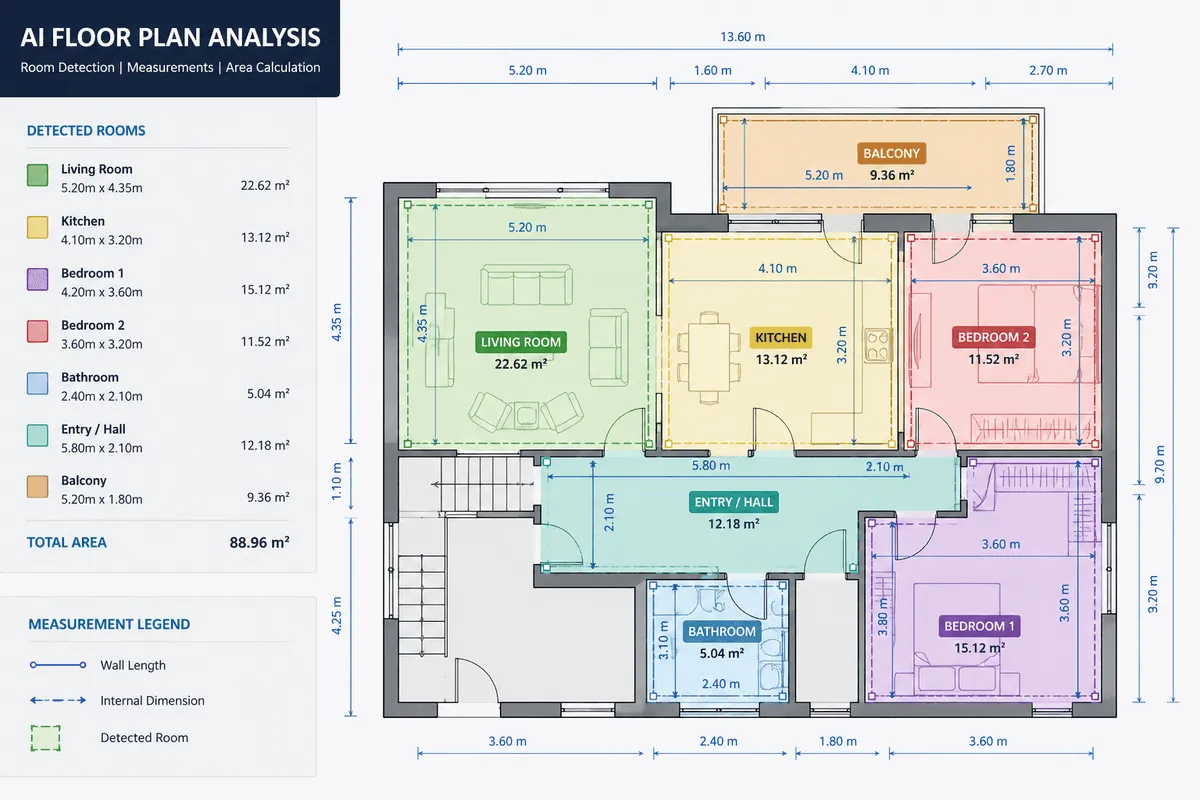
Why it is hard
A drawing shows a room's area. It never states it.
Text at odd angles
Tiny, rotated to follow walls, overlapping hatches. Ordinary OCR misses it.Symbols that look alike
Abstract line art that changes between firms, regions and decades.Walls drawn many ways
Double lines, fills and hatches all mean “wall”. Openings are just gaps.General AI guesses
Ask a general model to count doors and it will answer confidently, and wrongly.
| Topic | Tracing by hand, or a general AI model | A model tuned on your drawings |
|---|---|---|
| Speed | Hours of tracing and measuring per sheet | Minutes per sheet once the pipeline runs |
| Measurements | Estimated by eye, or invented by the model | Computed from geometry at drawing scale |
| Output | A marked-up PDF, or a paragraph of prose | Structured JSON with rooms, openings and adjacency |
| Checking | Re-measure the sheet to find the mistake | Every value links back to where it was found |
Where every project starts
What our models already read
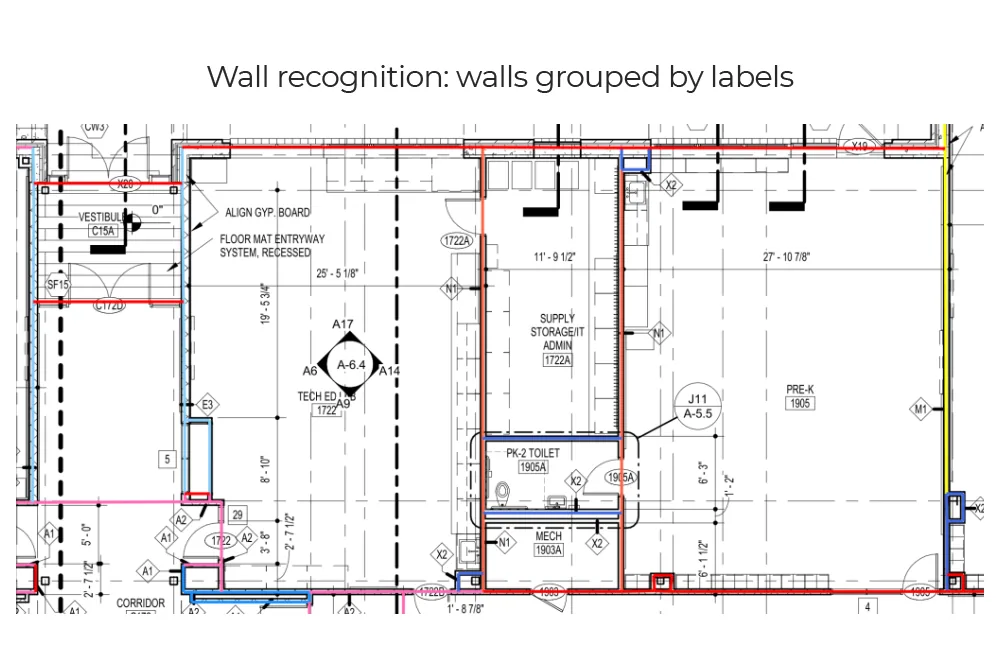
Walls
Wall runs are traced and grouped by the type label on the drawing, so partitions and exterior walls can be measured separately.
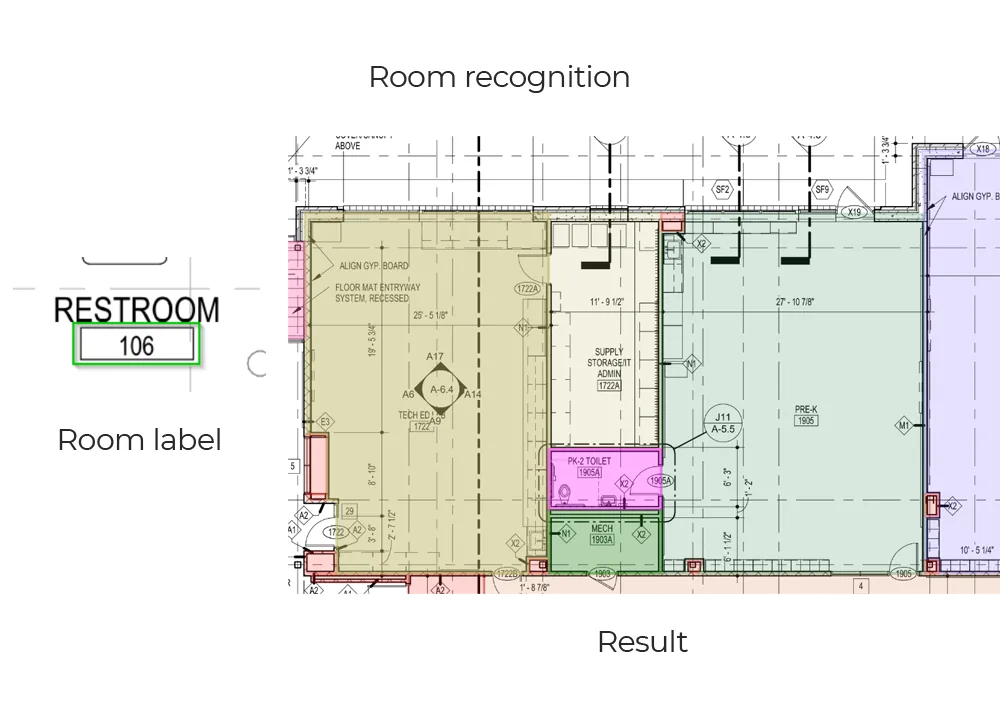
Rooms and areas
Room tags like “Restroom 106” are read, and the enclosed space around each tag is filled in as a polygon with an area at drawing scale.
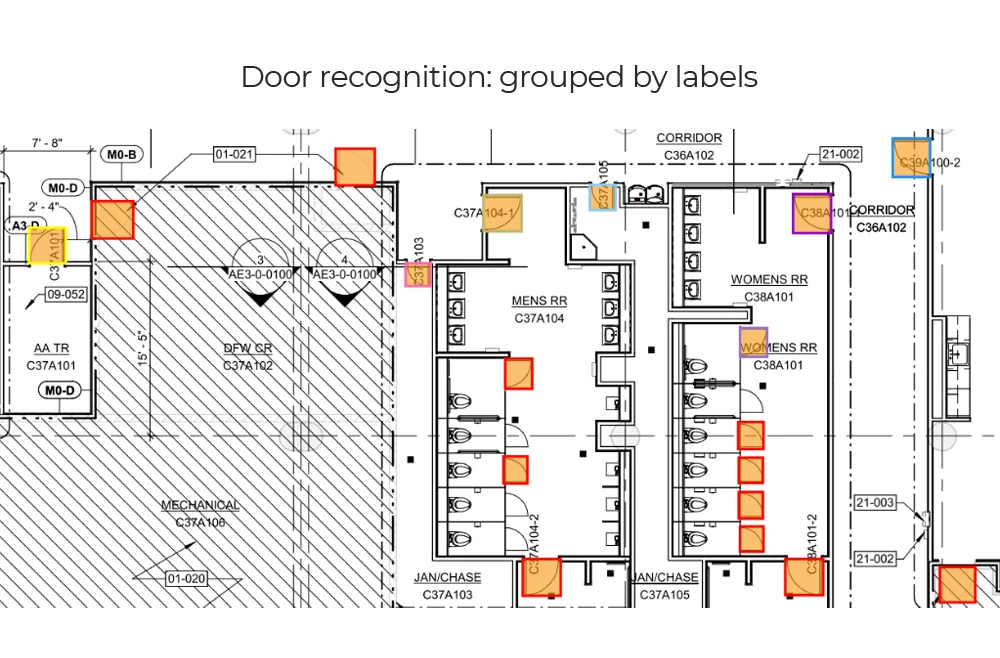
Doors
Door symbols are detected with their swing and grouped by tag, ready to match against the door schedule for widths and fire ratings.
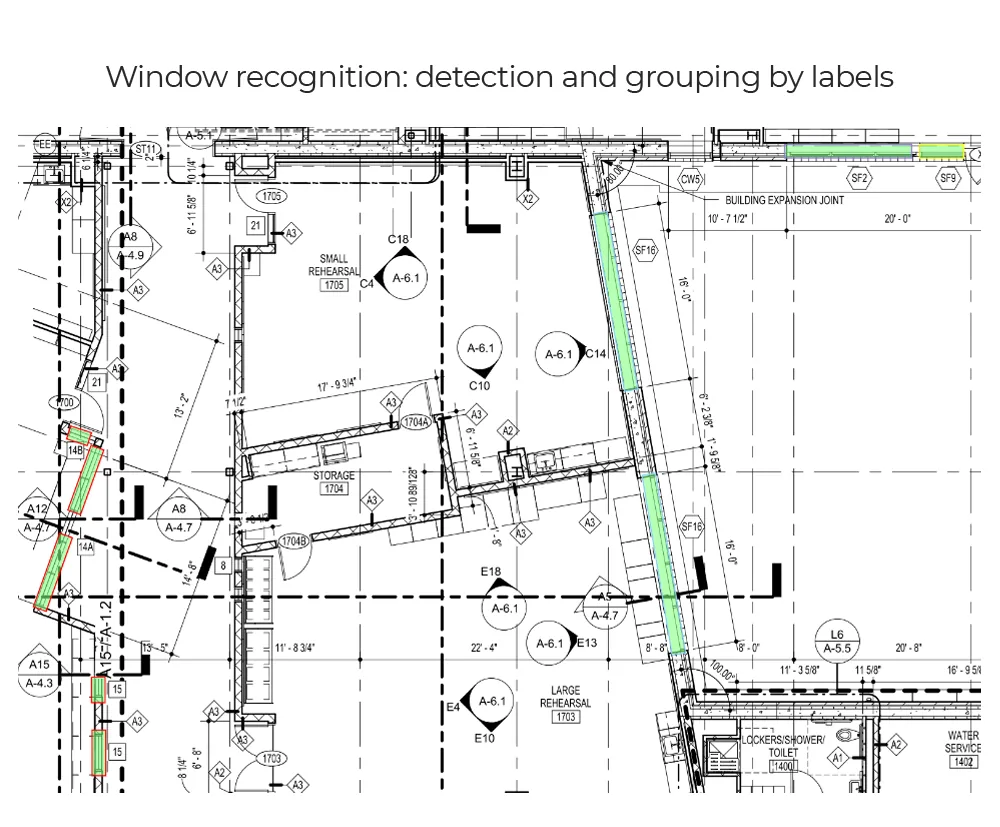
Windows
Windows are found along straight and angled walls and grouped by their labels, including long storefront runs.
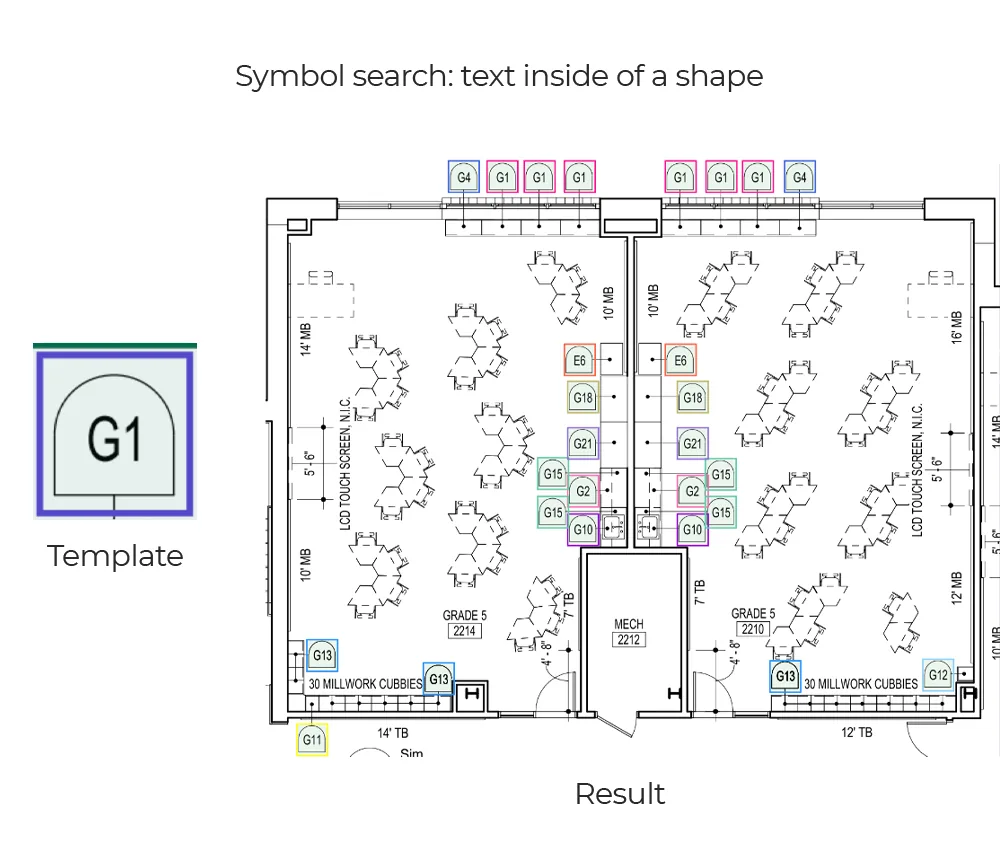
Tags and symbols
A template symbol, such as a G1 tag, is searched across the sheet, and every match is read, located and counted.
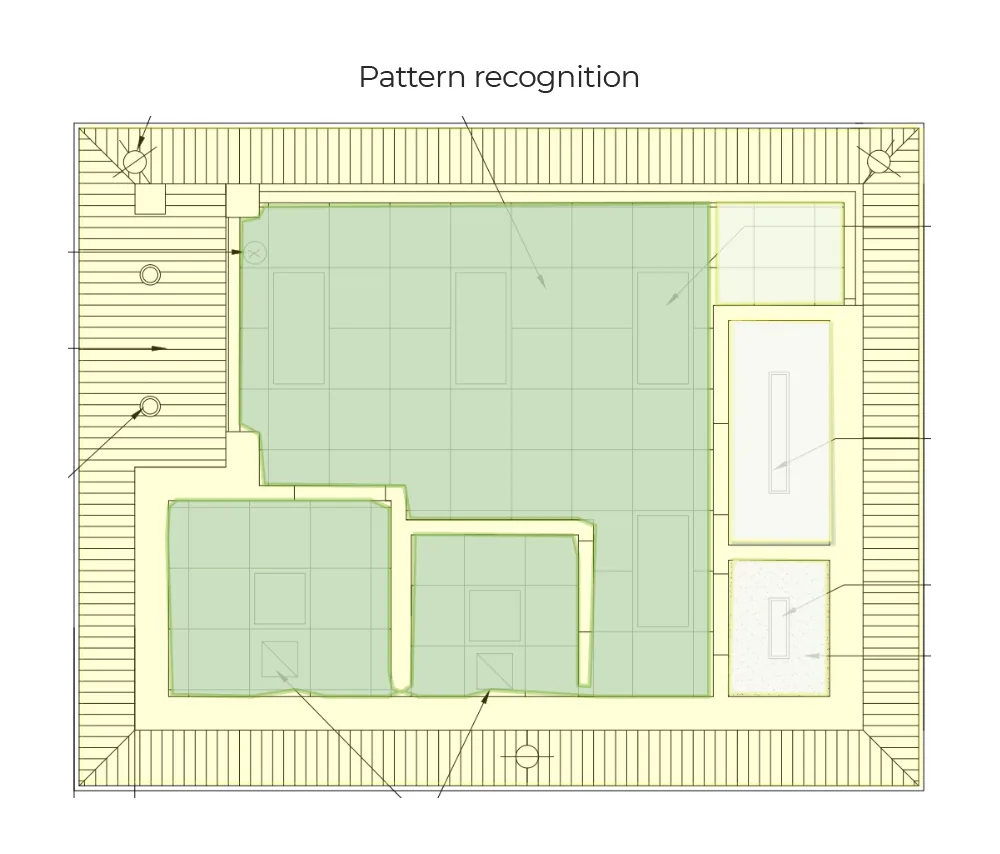
Hatch patterns
Hatched and patterned regions are recognised, so areas can be separated by finish or material.
On drawings of a kind the models have seen before, this gets most of the way there on its own. It is rarely all the way there — which is the next section.
How we work
We fine-tune those models on your drawings
Step 1: Run our models on your sheets
about 2 business days
Send one plan and see what the models find on it before any tuning. It is the cheapest way to find out whether what you want is feasible at all.- No call needed
- NDA on request
Step 2: Fine-tune on your drawing set
4–6 weeks
We label a sample of your sheets and tune the models to your conventions, measured against your own manual results on fields you choose.- Accuracy target agreed up front
- You own the trained weights
Step 3: Run it where the work happens
Ongoing
An API inside your product, a batch job for your estimators, or a service in your own cloud. Retrained as new drawing styles arrive.- Low-confidence values flagged for review
What you get back
Spatial data, not a picture of it
- JSON or CSV per sheet, by API or in batches
- An annotated overlay, so a human can check it
- Low-confidence values flagged, never filled in silently
| Field | What it contains |
|---|---|
| rooms[] | Name from OCR, polygon, net area, adjacent rooms and the doors between them |
| walls[] | Start and end points, length at drawing scale, type label |
| doors[] | Tag, position, width, swing, the two spaces it connects |
| windows[] | Tag, position, width, host wall |
| text[] | Every string read on the sheet with its bounding box: dimensions, notes, room names |
| symbols[] | Class, position and counts per room for fixtures and MEP symbols |
Delivery
It has to land where the work already happens
An API in your product
Send a sheet, receive JSON. For PropTech and construction software teams.Your cloud or your servers
Deployed in your own account or on-prem when plans cannot leave the building.Tuned to your sheets
Trained on the symbols, fonts and drawing styles you actually receive.A human in the loop
Low-confidence items go to review, and corrections feed the next round of training.
Who we build for
One pipeline, different questions asked of it
- Construction →
Construction
Takeoffs, counts and drawing review - Estimating & QS →
Estimating & QS
Measurement straight from the sheet - Architecture & AEC →
Architecture & AEC
Drawing checks and schedule reconciliation - PropTech →
PropTech
Layout data for listings and valuation - Software products →
Software products
Drawing intelligence inside your platform
Start here
See it on your own drawing first
- Every room with its name and area
- Wall lengths, door and window counts
- Text and dimensions read off the sheet
- An annotated overlay to check it against
What comes back is what our models do before any tuning. It shows you the starting point, not the best we can do — Fine-tuning is what closes the gap.
Send us one sheet
We run it through our floor plan models and send back the extracted data with an annotated overlay, so you can see what comes off your own drawings before anyone books a call.
- Back in about 2 business days
- PDF, DXF or a scan
- NDA on request
FAQ
Questions, answered
More detail in the full FAQ.
Not off the shelf. We have base models — models already trained on floor plans, which read walls, rooms, doors, windows, text and symbols — and every project fine-tunes those on the drawings that client actually receives. What you buy is a model tuned to your sheets and delivered into your workflow, which is weeks of work rather than the many months training one from nothing would take.
Straight out of the box on a typical plan our base models are generally above 80% on the elements they were built for, which is enough to tell whether a job is feasible but not enough to run unattended. Fine-tuning on your drawings is what closes the gap, and we agree a target on the specific fields you care about before starting rather than quoting a headline number.
Vector PDFs, DXF exports, and scanned or photographed plans. Where a DXF is available we read the vector geometry directly, which gives exact lengths and areas. For PDFs and scans we combine segmentation, object detection and OCR of the printed dimensions, and calibrate against the scale note on the sheet.
Structured JSON or CSV with rooms, walls, doors, windows, text and symbols, plus an annotated overlay so you can check the result against the drawing. Every value keeps a link to where on the sheet it was found, so a disagreement can be settled by looking rather than re-measuring.
General vision-language models handle the spatial layout of a high-resolution drawing poorly and tend to invent counts and dimensions rather than admit uncertainty. We split the problem instead: segmentation for walls and rooms, detectors for symbols, OCR built for rotated drawing text, and a language model only on top of the structured result.
Yes. We sign an NDA with every client, and the pipeline can run as an API in your own cloud account or on your own servers, so drawings never leave your network.
Get in touch
Tell us what is on your drawings
Describe the sheets you get and what you need off them. We will tell you what our models already handle, what needs fine-tuning on your drawings, and what is not worth automating at all.
- Reply time
- Within 1 business day
Would rather show than tell? Send one sheet for a free analysis