Use case
Door detection, with the swing
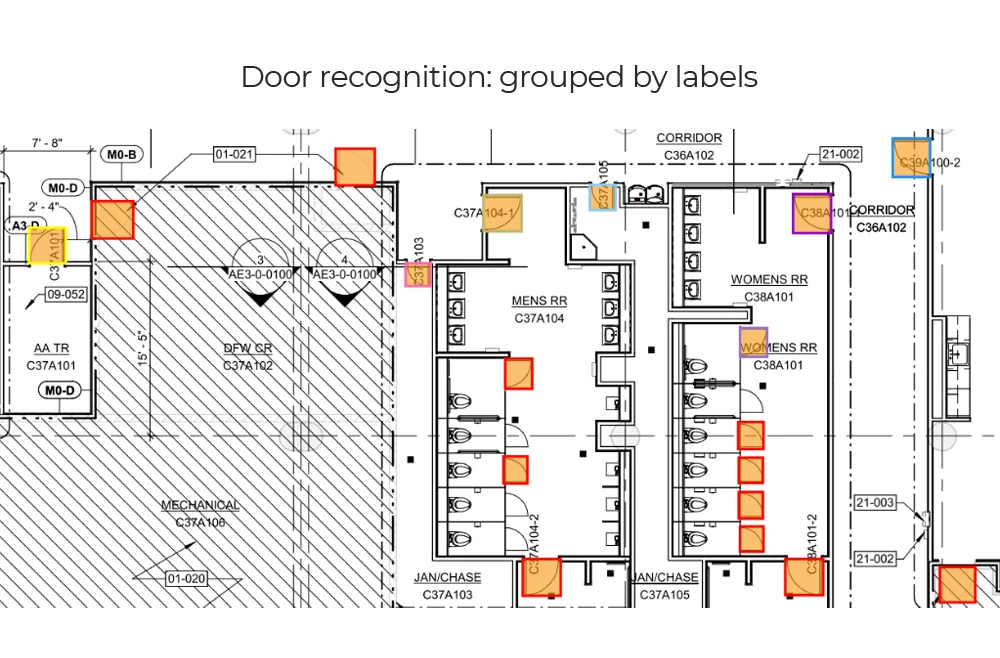
Why it is awkward
The part that is not obvious
What comes back
- Position and bounding geometry per door
- Swing direction and leaf type where drawn
- The wall it sits in and the two spaces it joins
- Door tag read from the sheet
- Clear opening width, where dimensions allow
How it is read
From line art to a record
- Stage 1
Find the candidates
Door symbols are located across the sheet at drawing scale, covering the leaf-and-arc motif and the variants that drop the arc entirely. Detection runs on the plan views only — schedules are handled as tables, not as drawings.Candidate doors with positions - Stage 2
Read the swing
Where an arc is drawn, its centre and sweep give the hinge side and the direction the leaf opens, which is what egress and clearance questions actually turn on. Where no arc is drawn, that is recorded as unknown rather than assumed.Hinge side and swing direction - Stage 3
Tie it to the wall and the rooms
A door is only useful when it knows where it goes. Each detection is matched to the wall run it interrupts and to the two spaces that wall separates, which is what turns a count into a connection.Host wall and the two spaces - Stage 4
Read the tag and the width
The door tag beside the symbol is read, including the rotated and abbreviated cases, and a clear opening width is measured where the drawing dimensions it or the schedule supplies it.Tagged, measured doors
The output
What lands in your system
| Field | What it contains |
|---|---|
| doors[].position | Location and bounding geometry in drawing coordinates |
| doors[].type | Single, double, sliding, folding or cased opening, to your drawing conventions |
| doors[].swing | Hinge side and opening direction where an arc is drawn; null where it is not |
| doors[].tag | Door reference read from the sheet, ready to match against the schedule |
| doors[].host_wall | The wall run the door sits in, with its type label |
| doors[].connects[] | The two spaces the door joins, as room ids |
| doors[].width | Clear opening width where the sheet or schedule gives it, with its source |
Where it goes wrong
The cases worth knowing about first
Cased openings drawn as doors
Some offices draw a cased opening identically to a door minus the arc, some tag it, some leave it to the schedule. Counting them as doors inflates every downstream number, so which convention you use is settled before tuning rather than after.
Doubles and sliders without arcs
Double doors, sliders and folding sets are the variants most often drawn without a swing. They are detected as doors, but the swing comes back empty rather than invented — an empty field is recoverable, a wrong one is not.
Symbols under other linework
Doors clipped at a sheet edge, crossed by a dimension string or buried under a detail bubble lose part of the shape the detector relies on. These surface as low-confidence detections for review rather than being dropped silently.
What fine-tuning on your drawings adds
Start here
See it on a sheet of your own
- Position and bounding geometry per door
- Swing direction and leaf type where drawn
- The wall it sits in and the two spaces it joins
Send us one sheet
We run it through our floor plan models and send back the extracted data with an annotated overlay, so you can see what comes off your own drawings before anyone books a call.
- Back in about 2 business days
- PDF, DXF or a scan
- NDA on request
FAQ
Questions on this one
Yes. Tags detected on the plan views are matched to the rows of the schedule sheet, which surfaces doors on the plan with no schedule row and rows with no door. The mismatches are reported for a person to resolve.
If your drawings do. Some offices draw them identically apart from the arc, some tag them, some rely on the schedule. Which convention yours uses is exactly the sort of thing that gets tuned in.
Get in touch
Tell us what is on your drawings
Describe the sheets you get and what you need off them. We will tell you what our models already handle, what needs fine-tuning on your drawings, and what is not worth automating at all.
- Reply time
- Within 1 business day
Would rather show than tell? Send one sheet for a free analysis