Use case
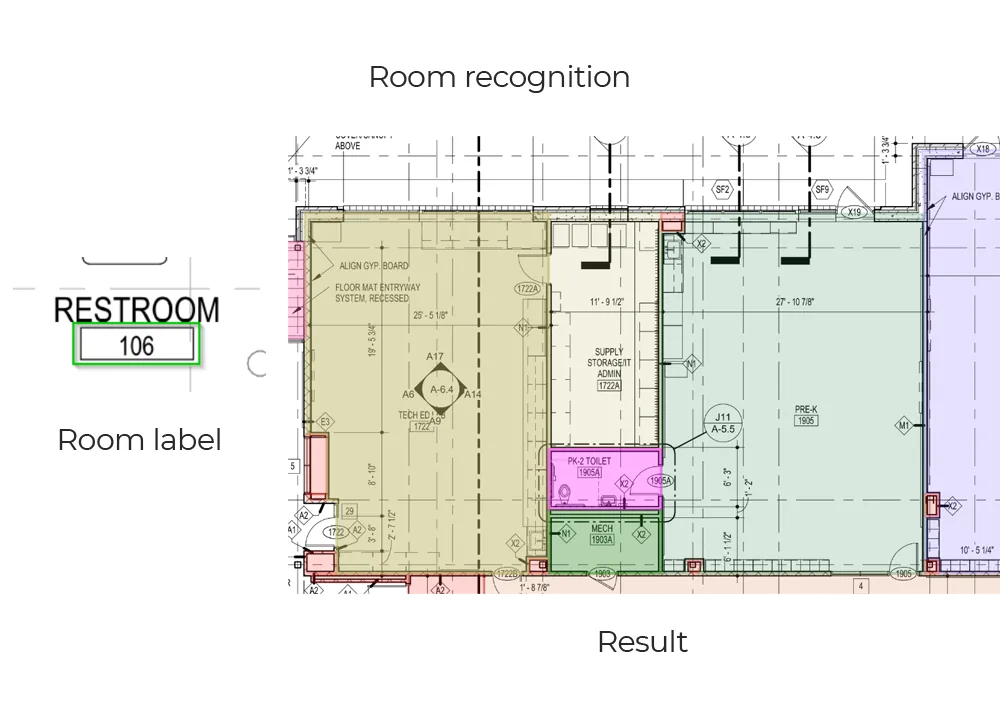
Room detection and area
Why it is awkward
The part that is not obvious
What comes back
- A polygon per room, in drawing coordinates
- Net floor area at the sheet's scale
- Room name and number read from the tag
- Which rooms are adjacent, and the doors between them
- Perimeter length, for skirting and finish takeoff
How it is read
From line art to a record
- Stage 1
Calibrate the scale
The scale note, or a dimension string whose value is printed next to the geometry it measures, is read first. Every area that follows is computed from it, so a sheet plotted at an unstated scale is flagged rather than guessed at.Drawing units to real units - Stage 2
Trace the walls
Wall runs are found across the conventions that all mean the same thing — double lines, solid fills, hatched cores — so the boundary of each space is known before anything is closed.Wall faces and centrelines - Stage 3
Close the boundary
Every door and cased opening is a deliberate gap in that boundary. The polygon has to be closed across each one without leaking into the space on the other side, which is the step that actually decides whether a room exists.One polygon per space - Stage 4
Attach the name, then measure
Room tags are read and matched to the polygon they describe — usually the one they sit inside, not always. Net area and perimeter are computed at the calibrated scale, and adjacency is taken from the openings crossed.Named, measured rooms
The output
What lands in your system
| Field | What it contains |
|---|---|
| rooms[].polygon | Vertices in drawing coordinates, closed across door and cased openings |
| rooms[].name | Room name and number read from the tag, with the confidence of the read |
| rooms[].area | Net internal area at drawing scale, on the measurement basis your team works to |
| rooms[].perimeter | Wall length around the space, for skirting, finishes and decoration takeoff |
| rooms[].adjacent[] | The spaces this room connects to, and the door or opening joining each pair |
Where it goes wrong
The cases worth knowing about first
Open-plan space
Where a kitchen stops and a living area starts is a convention your office holds, not a fact the drawing records. We need that rule before a model can apply it consistently — without one, every boundary is arbitrary and no two sheets agree.
Tags placed outside the room
A label nudged clear of a dimension string, or carried out on a leader line, sits outside the polygon it names. Leaders are followed where drawn and proximity used otherwise, and a genuinely ambiguous tag is flagged rather than assigned to whichever polygon is nearest.
Joinery read as walls
Fitted units, low partitions and shaded plant enclosures can close a boundary that should stay open. Line weight and layer separate them where the drawing carries that information, and tuning on your sheets settles the rest.
What fine-tuning on your drawings adds
Start here
See it on a sheet of your own
- A polygon per room, in drawing coordinates
- Net floor area at the sheet's scale
- Room name and number read from the tag
Send us one sheet
We run it through our floor plan models and send back the extracted data with an annotated overlay, so you can see what comes off your own drawings before anyone books a call.
- Back in about 2 business days
- PDF, DXF or a scan
- NDA on request
FAQ
Questions on this one
Net internal by default, measured to the inside face of the enclosing walls. Gross, and any wall-centreline or IPMS basis you work to, is a matter of how the polygon is offset — we set it to whichever standard your team uses rather than picking one for you.
They need a rule before they need a model: where does the kitchen stop and the living area start? Once your convention is agreed, it is applied consistently. Without one, any answer is arbitrary.
Yes, from the room names and the fixtures inside each polygon. It is one of the more reliable outputs on residential plans, and a common input to listing and valuation systems.
Get in touch
Tell us what is on your drawings
Describe the sheets you get and what you need off them. We will tell you what our models already handle, what needs fine-tuning on your drawings, and what is not worth automating at all.
- Reply time
- Within 1 business day
Would rather show than tell? Send one sheet for a free analysis