Drawing OCR
OCR that survives a drawing
- Text at any angle
- Dimensions parsed to numbers
- Position kept for every string
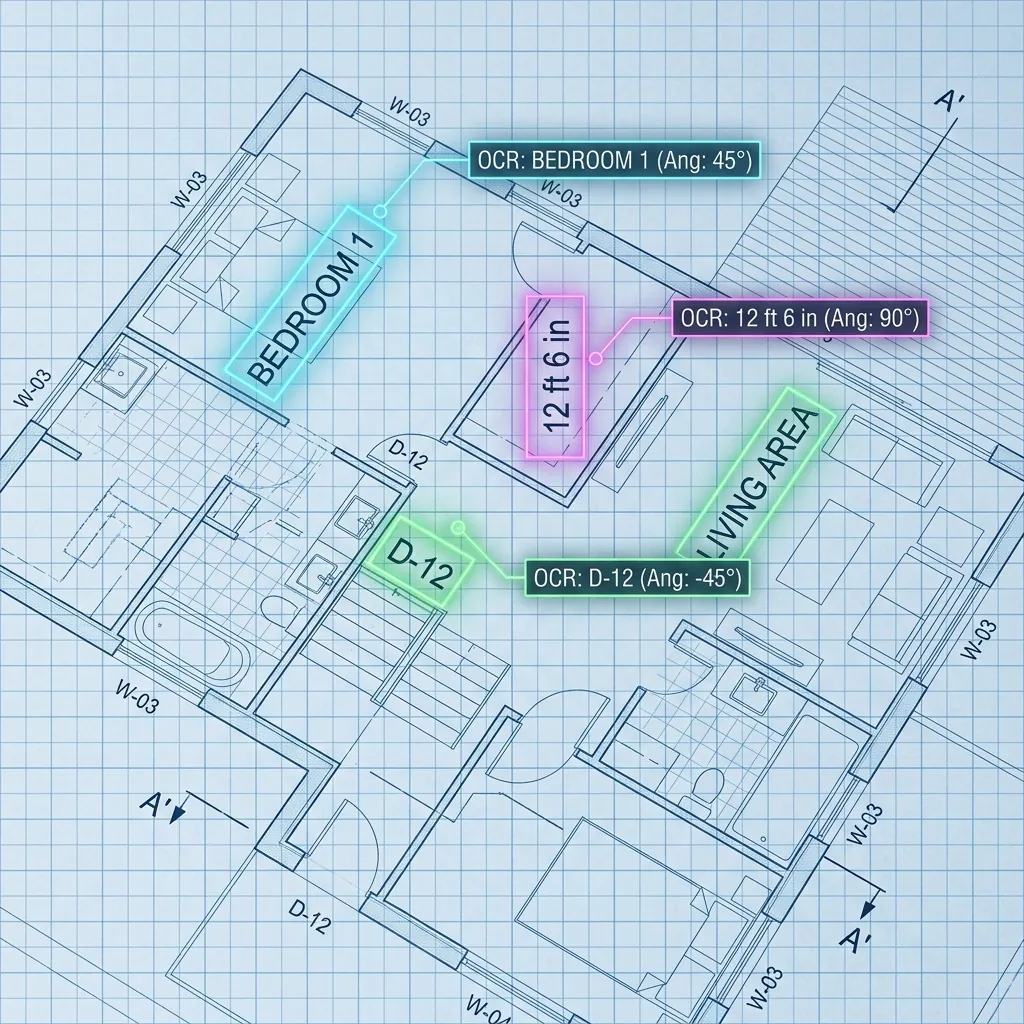
Why it is hard
Generic OCR reads a drawing as noise
Rotated text
Strings running vertically, diagonally or upside down, read at the angle they were drawn.Dimensions
Feet-and-inches and metric strings parsed into numbers, including stacked and chained dimension runs.Tags and abbreviations
Door tags, room numbers and trade abbreviations, read against the legend rather than a dictionary.Title blocks
Sheet number, title, scale, revision and issue date pulled from the block, whatever its layout.
How it runs
Specialist models, chained
- Stage 1
Prepare the sheet
Deskewed, tiled and upsampled where the text is small, so thin strokes survive into the detector.Tiles at a workable resolution - Stage 2
Find the text, at any angle
Text detection runs on the drawing rather than a page model, producing oriented boxes rather than lines.Oriented text regionsDBNet - Stage 3
Read and normalise
Each region is rotated upright and read, then dimension strings are parsed into numeric values with units.Strings and parsed numbersCRNNTrOCR - Stage 4
Attach text to geometry
Strings are associated with what they describe: a room name to its polygon, a door tag to its symbol, a dimension to the run it measures.Text bound to elements
What comes back
Data, with a trail back to the sheet
- Every string on the sheet with its bounding box and angle
- Dimensions parsed into numbers with units
- Title block fields as named values
- Tags attached to the elements they label
- Confidence per string, so weak reads can be routed to review
This is our base model — already trained on floor plans, not yet on yours. For a project it is fine-tuned on your drawings, against a target you set, on the fields you actually use. How fine-tuning works.
Start here
See it on a drawing of your own
- One sheet is enough — PDF, DXF or a scan
- Back in about 2 business days, with an annotated overlay
- No call required, NDA on request
Send us one sheet
We run it through our floor plan models and send back the extracted data with an annotated overlay, so you can see what comes off your own drawings before anyone books a call.
- Back in about 2 business days
- PDF, DXF or a scan
- NDA on request
FAQ
Questions, answered
Less well than printed text, and how much less depends entirely on the hand. Consistent draughting lettering is usually workable; a marked-up site print often is not. This is worth testing on your own sheets before it becomes an assumption in a project plan.
Where the sheet or the legend defines them, yes. Where they are house convention, they become part of what gets tuned in — you tell us what they mean once and the model keeps them.
Linked. A loose list of strings is not much use. Room names attach to polygons, tags to symbols, dimensions to the runs they measure, and everything keeps its position so you can check it.
Get in touch
Tell us what is on your drawings
Describe the sheets you get and what you need off them. We will tell you what our models already handle, what needs fine-tuning on your drawings, and what is not worth automating at all.
- Reply time
- Within 1 business day
Would rather show than tell? Send one sheet for a free analysis