Use case
Window detection, including the awkward walls
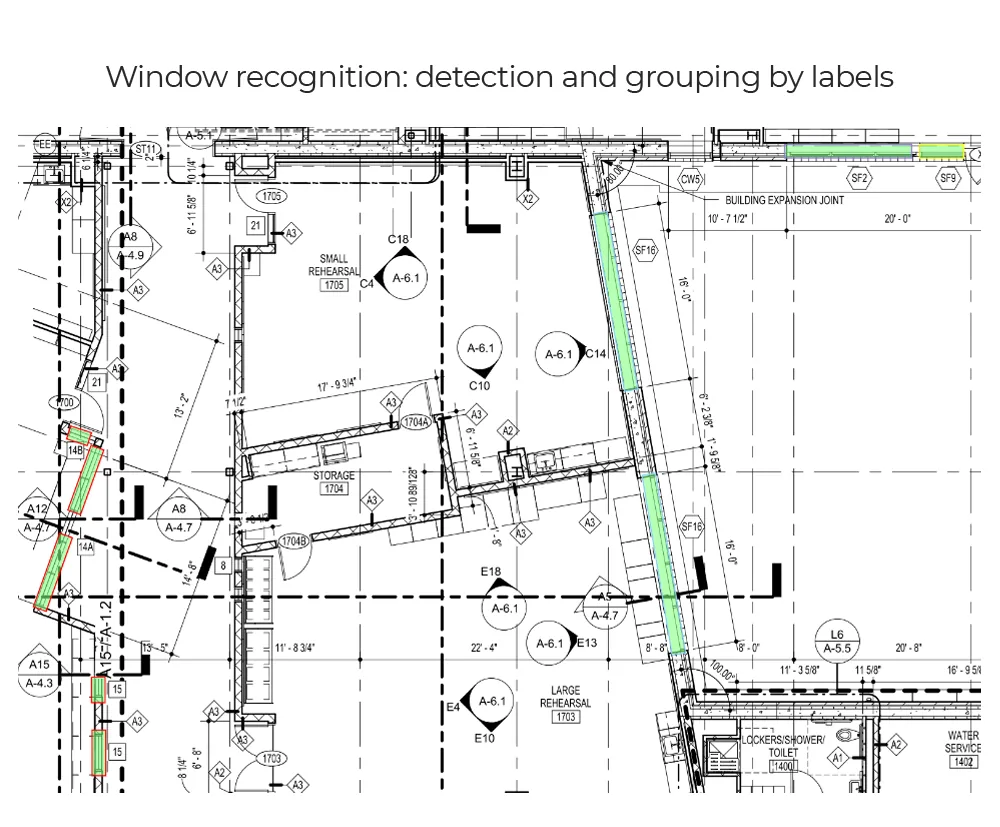
Why it is awkward
The part that is not obvious
What comes back
- Position and width per window
- The wall it sits in, at any angle
- Window tag read from the sheet
- Storefront runs segmented to your counting convention
- Rough opening dimensions, where the sheet gives them
How it is read
From line art to a record
- Stage 1
Trace the exterior runs
Windows are interruptions in a wall rather than objects sitting on it, so the wall has to exist first. Exterior and party walls are traced and ordered along their length before anything is looked for inside them.Wall runs with orientation - Stage 2
Find the interruptions
The three-line motif is matched along each run, including the rotated and stretched versions that appear on angled and curved walls where the familiar shape no longer looks familiar.Candidate window segments - Stage 3
Segment to your counting rule
A long storefront run is one window or fifteen depending on how your schedule counts it — by structural bay, by tag, or by panel. The run is split to whichever rule you work to, because a mismatch with the schedule causes more trouble than a missing count.Windows as your schedule counts them - Stage 4
Read tags and openings
Window references beside each segment are read and matched, and rough opening dimensions are taken from the schedule or the dimension strings where they exist rather than inferred from the drawn width.Tagged windows with dimensions
The output
What lands in your system
| Field | What it contains |
|---|---|
| windows[].position | Location along its host wall, in drawing coordinates |
| windows[].width | Drawn width at drawing scale |
| windows[].host_wall | The wall run it sits in, at any angle |
| windows[].angle | Orientation of the opening, which matters for daylight and elevation work |
| windows[].tag | Window reference read from the sheet |
| windows[].rough_opening | Parsed dimensions where the schedule or callout gives them, with the source noted |
Where it goes wrong
The cases worth knowing about first
Angled and curved walls
The window motif rotates and stretches with its wall, and on a curve it stops being a repeating pattern at all. This is the single most common source of missed windows, and the first thing tuning on your sheets fixes.
Storefront counted two ways
Glazing subcontractors usually hold a firm view about what one unit is, and it rarely matches how the architect drew it. There is no neutral answer, so the rule is agreed with you and then applied identically across the set.
Louvres and openings that look like glazing
Louvres, vents and unglazed openings share the motif closely enough to be counted as windows. Where your drawings distinguish them by tag or hatch they are separated; where they do not, it needs a labelled sample.
What fine-tuning on your drawings adds
Start here
See it on a sheet of your own
- Position and width per window
- The wall it sits in, at any angle
- Window tag read from the sheet
Send us one sheet
We run it through our floor plan models and send back the extracted data with an annotated overlay, so you can see what comes off your own drawings before anyone books a call.
- Back in about 2 business days
- PDF, DXF or a scan
- NDA on request
FAQ
Questions on this one
Where the schedule or the dimension strings give them, yes, read and parsed into numbers. Where they are only implied by the drawn width, the measurement comes back with the scale caveat attached rather than as a manufacturing dimension.
However your schedule counts it. We set the rule with you — by structural bay, by tag, or by panel — because there is no neutral answer and a mismatch with the schedule causes more trouble than a missing count.
Get in touch
Tell us what is on your drawings
Describe the sheets you get and what you need off them. We will tell you what our models already handle, what needs fine-tuning on your drawings, and what is not worth automating at all.
- Reply time
- Within 1 business day
Would rather show than tell? Send one sheet for a free analysis