Floor plan analysis
Turn a floor plan into a model of the space
- Vector PDF, DXF and scans
- Areas at drawing scale
- Room adjacency graph
Why it is hard
A plan records the building, not the data about it
Wall runs
Traced and grouped by the type label, so partitions and exterior walls can be measured apart.Rooms and areas
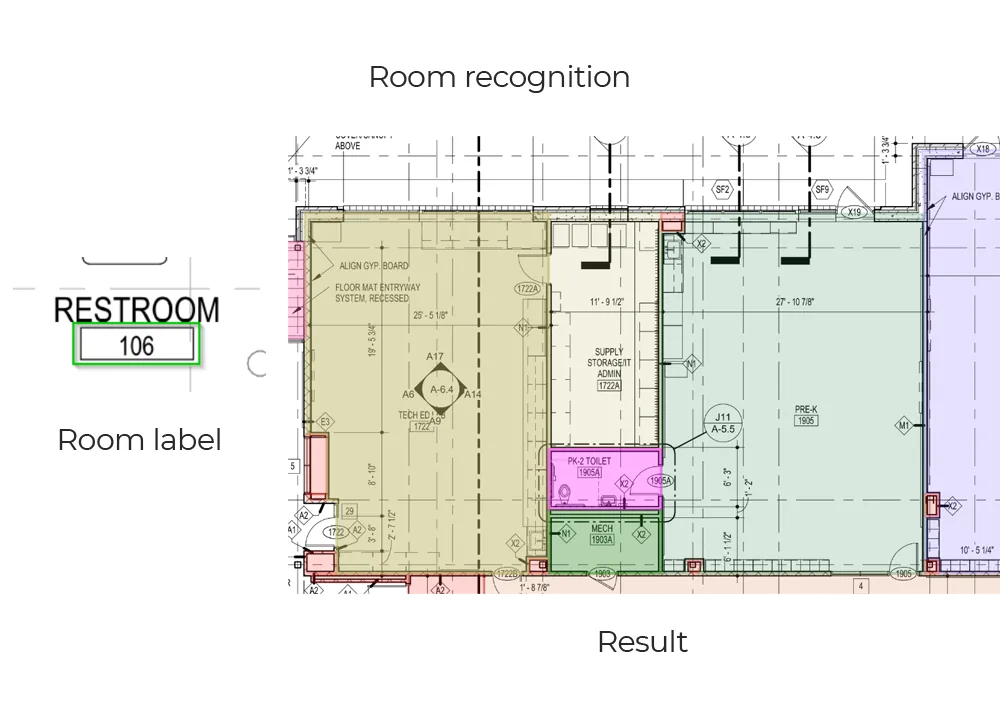
Polygons closed from the wall loops, named from the tag inside them, measured at drawing scale.Doors and windows
Located with swing and host wall, grouped by tag so they can be matched to a schedule.Adjacency
Which rooms touch, and which doors join them — the part a picture of a plan cannot tell you.
How it runs
Specialist models, chained
- Stage 1
Prepare the sheet and read the scale
Sheets are deskewed and tiled so fine lines survive, and the scale note (1:100, or 1/4" = 1'-0") is read so measurements come back in real units.Clean tiles with a calibrated scale - Stage 2
Read the text
Angle-aware OCR reads room names, dimensions, door tags and notes, keeping the position of each string on the sheet.Text layer with coordinatesDBNetCRNN - Stage 3
Segment walls and open space
Segmentation separates wall from floor. Where a DXF exists, the vector geometry is read directly and no inference is needed.Wall mask and vector linesU-NetHRNetezdxf - Stage 4
Detect openings and symbols
Detectors trained on drawings rather than photographs find doors with their swing, windows, stairs and fixtures.Located, classified elementsYOLOMask R-CNN - Stage 5
Close rooms and build the graph
Wall loops become room polygons, named from the tags that fall inside them. Doors become edges, so the plan knows what connects to what.Rooms, areas and adjacency
What comes back
Data, with a trail back to the sheet
- Rooms with name, polygon, net area and adjacent spaces
- Wall runs with length at scale and type label
- Doors and windows with tag, width, swing and host wall
- Every string read on the sheet, with its position
- An annotated overlay for checking against the drawing
This is our base model — already trained on floor plans, not yet on yours. For a project it is fine-tuned on your drawings, against a target you set, on the fields you actually use. How fine-tuning works.
Start here
See it on a drawing of your own
- One sheet is enough — PDF, DXF or a scan
- Back in about 2 business days, with an annotated overlay
- No call required, NDA on request
Send us one sheet
We run it through our floor plan models and send back the extracted data with an annotated overlay, so you can see what comes off your own drawings before anyone books a call.
- Back in about 2 business days
- PDF, DXF or a scan
- NDA on request
FAQ
Questions, answered
Both, but they need different tuning. Residential plans mostly want room names, areas, bedroom and bathroom counts and door and window schedules. Commercial sets add door tags, wall types, MEP symbols and separate schedule sheets. We tune to the plan styles you actually receive rather than to an average of both.
Then areas cannot be trusted, and we say so rather than producing a number. If a known dimension appears anywhere on the sheet we can calibrate against it; otherwise the output comes back with geometry and counts but areas flagged as unscaled.
Deskewing and tiling recover a surprising amount, and the OCR is built for drawing text rather than documents. But a 150 DPI photo of a folded print has a real ceiling, and the free analysis is the honest way to find where yours sits.
Get in touch
Tell us what is on your drawings
Describe the sheets you get and what you need off them. We will tell you what our models already handle, what needs fine-tuning on your drawings, and what is not worth automating at all.
- Reply time
- Within 1 business day
Would rather show than tell? Send one sheet for a free analysis