How it works
One sheet in, a model of the space out
- Six stages
- Each one checkable
- Scale verified before anything is measured
The design decision
Why it is a chain and not one big model
Splitting the problem means every number has a provenance. An area comes from a polygon, which came from a wall mask, which came from a sheet whose scale was verified. A count comes from detections you can see boxed on an overlay. When something is wrong, you can tell which stage got it wrong.
It also means each stage improves independently. Tuning the symbol detector for your legend does not disturb how rooms are closed, and better OCR does not require retraining the segmentation.
- Every value traceable to a place on the sheet
- Failures localised to a stage, not the whole system
- Stages tuned separately, on your drawings
The pipeline
Six stages
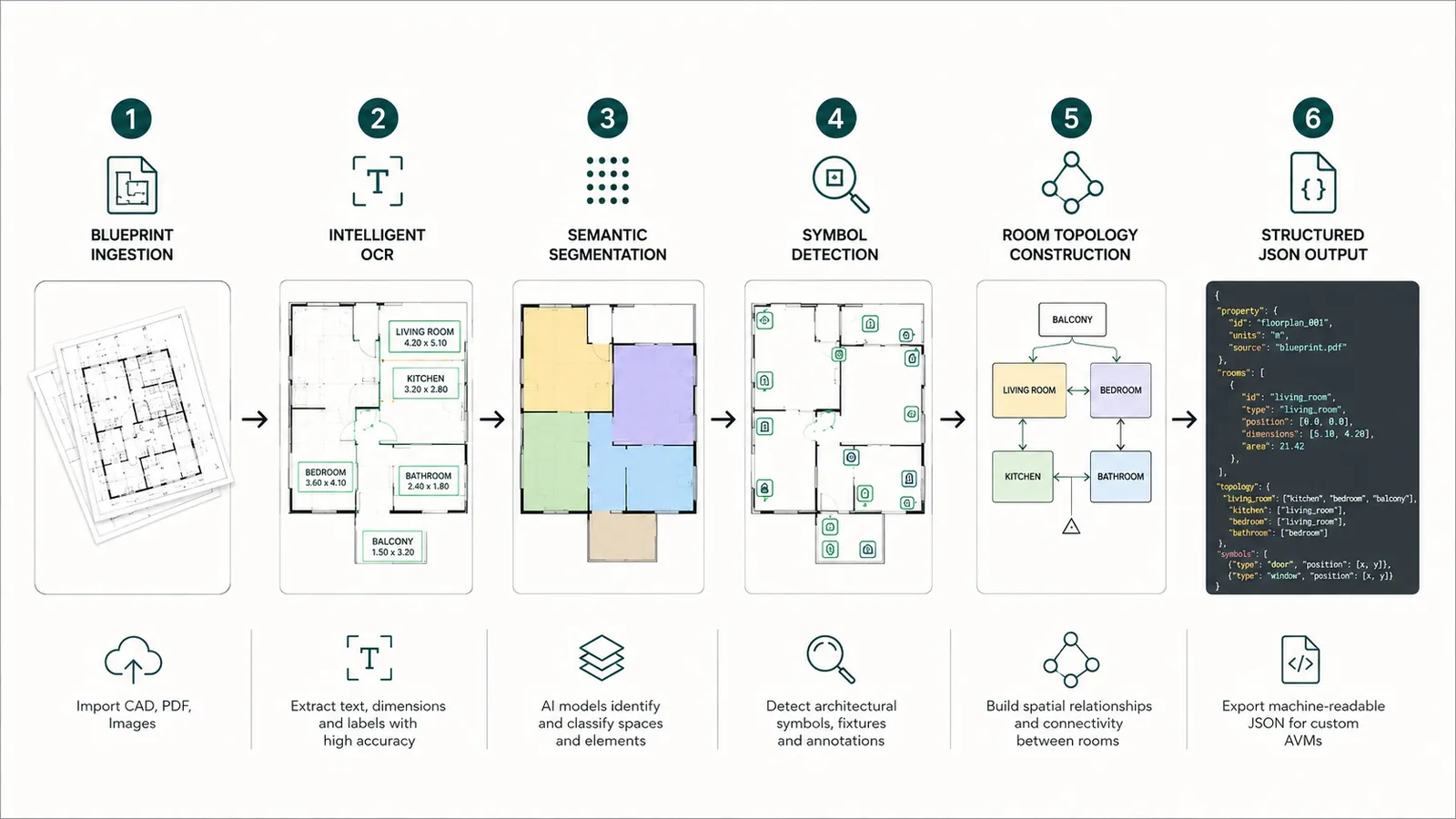
- Stage 1
Prepare the sheet and read the scale
Sheets are deskewed and tiled so fine lines survive the resize, and the scale note — 1:100, or 1/4" = 1'-0" — is read and checked against a known dimension. Nothing downstream can be trusted if this is wrong.Clean tiles with a verified scale - Stage 2
Read the text, at any angle
Text detection runs on oriented boxes rather than lines of prose, so a room name rotated to follow a wall is found. Each string keeps its position, which is what lets it be attached to something later.Text layer with coordinatesDBNetCRNN - Stage 3
Segment walls from open space
Segmentation separates wall from floor, which is harder than it sounds when walls are variously two lines, a solid fill or a hatch. Where a DXF exists the vector geometry is read directly and no inference is needed at all.Wall mask and vector linesU-NetHRNetezdxf - Stage 4
Detect openings and symbols
Detectors trained on drawings rather than photographs find doors with their swing, windows in their host walls, stairs and fixtures. This is the stage most affected by your legend, and the one fine-tuning changes most.Located, classified elementsYOLOMask R-CNN - Stage 5
Close rooms and build the graph
Wall loops are closed across the openings that interrupt them, becoming room polygons named from the tags inside them. Doors become edges between rooms, so the plan knows what connects to what.Rooms, areas and adjacency - Stage 6
Compute quantities and export
Areas, lengths and counts are computed at scale and exported as JSON or CSV, with an annotated overlay alongside so a person can check the result against the drawing it came from.Structured output and overlayJSONCSVREST API
What comes out
The default shape of the result
| Field | What it contains |
|---|---|
| rooms[] | Name from OCR, polygon, net area, adjacent rooms and the doors between them |
| walls[] | Start and end points, length at drawing scale, type label |
| doors[] | Tag, position, width, swing, the two spaces it connects |
| windows[] | Tag, position, width, host wall |
| text[] | Every string read on the sheet with its bounding box: dimensions, notes, room names |
| symbols[] | Class, position and counts per room for fixtures and MEP symbols |
Start here
Watch it run on your own sheet
- One sheet is enough — PDF, DXF or a scan
- Back in about 2 business days, with an annotated overlay
- No call required, NDA on request
Send us one sheet
We run it through our floor plan models and send back the extracted data with an annotated overlay, so you can see what comes off your own drawings before anyone books a call.
- Back in about 2 business days
- PDF, DXF or a scan
- NDA on request
FAQ
Questions, answered
Then fine-tuning is what makes it yours.
Only at the end, and only over structured data. Asking questions of a result — which rooms have no window, which doors are missing a schedule row — is a reasonable job for a language model once the measuring has already been done by something that measures. Pointing one at a drawing and trusting its counts is not.
It is flagged rather than papered over. If the scale cannot be established, areas come back marked unscaled. If text confidence is low, the string is routed to review rather than written in as fact. Silent failure is the thing that makes a pipeline untrustworthy.
Seconds to a couple of minutes depending on sheet size and how many stages are needed. The meaningful comparison is not to another piece of software but to the hours the same measuring takes by hand.
Detection and OCR are where client-specific tuning pays off most, because symbol legends and lettering conventions vary most. Segmentation benefits where wall drafting conventions are unusual. Scale reading and geometry are largely universal.
Get in touch
Tell us what is on your drawings
Describe the sheets you get and what you need off them. We will tell you what our models already handle, what needs fine-tuning on your drawings, and what is not worth automating at all.
- Reply time
- Within 1 business day
Would rather show than tell? Send one sheet for a free analysis