AI Takeoff for Glazing Contractors: A Practical Workflow
By Floor Plan Analyzer, an AxcelerateAI practice
The value of AI takeoff for a glazing contractor is a bid-ready review workflow: find the right sheets, reconcile opening marks with schedules and deliver quantities in the estimator’s existing format. A fast count alone does not resolve whether the counted objects are the right assemblies, from the right revision, measured on the right basis.
This guide shows how to scope that workflow for windows, storefront and curtain-wall packages, with an invented worked example, an editable review template and a pilot checklist. Pricing, system interpretation and release of the bid remain with the estimating team.
What can AI do for a glazing takeoff?
A custom pipeline can help select relevant sheets, detect openings, read tags and schedules, associate physical instances with types and export supported counts and measurements for review. Agree the assembly boundaries, dimension basis, revisions and exception process first. A drawing overlay does not by itself establish net glass sizes, specification compliance or a released fabrication order.
- Count physical instances separately from repeated type marks.
- Keep gross assembly faces, entrance openings and glass sizes distinct.
- Measure total reviewed effort and export quality on your own sample before buying or building.
Where AI helps a glazing estimator—and where decisions remain
A glazing bid rarely starts with a clean list of purchasable units. Plans locate openings, elevations show arrangements, schedules supply types and dimensions, and specifications describe requirements that may not be drawn. The useful automation task is to connect those sources into reviewable quantities rather than turn a screenshot into a price.
For an estimating manager, the first question is which repeated work is constraining the team: finding the right pages, counting openings, transcribing schedules, matching marks, measuring assemblies or updating an existing workbook after an addendum. Choose one measurable workflow before expanding to the entire glazing package.
A sensible first delivery is an instance list and schedule match with overlays, source references and exceptions. The estimator confirms scope, resolves conflicts, applies rates and releases the bid. Design, system selection and fabrication approval follow their own agreed professional and supplier processes.
| Workstream | Automation can assist | Estimator reviews |
|---|---|---|
| Page selection | Locate plans, elevations, schedules and relevant notes | Correct issue, scope and missing sheets |
| Opening detection | Propose locations and repeated labels | Missed openings and duplicate views |
| Schedule extraction | Transcribe marks, dimensions and notes | Merged cells, units and type/instance meaning |
| Reconciliation | Link each physical occurrence to a type | Conflicts, alternatives and unresolved matches |
| Quantity export | Populate the agreed workbook fields | Measurement basis, rates and commercial inclusions |
Windows, storefront and curtain wall need different counting rules
Define the priced object before counting its visible divisions. A repeated window type may correspond to several installed units. A storefront elevation can contain a continuous frame, multiple infill areas and an entrance. A curtain-wall scope may be organized by elevations, zones or modules. These are proposed estimating categories; the actual package and supplier instructions control the breakdown.
Kawneer describes curtain wall as a non-structural exterior-wall system and distinguishes stick-built and unitized approaches. That distinction is a reason to preserve the named system and assembly context in the data rather than reduce every glazed line to a generic window count. It does not establish the system for a particular project.
Agree whether an entrance is priced as a separate item within a parent assembly, whether a corner is one assembly or two elevations, and how repeated typical floors are expanded. Store parent-child relationships so a door can be reviewed separately without automatically adding its area twice.
References: Kawneer: curtain wall system families
The drawing set to request before scoping automation
Ask for a representative package that includes an ordinary job and a difficult one. A polished single floor plan is useful for a demonstration, but it cannot establish whether a production workflow can reconcile the schedules, elevations and revisions your team actually receives.
Use an NDA and an approved file-transfer route when needed. Remove unrelated personal or confidential content. Identify which documents the reviewer considers authoritative for each field; if two documents disagree, the pipeline should surface the conflict instead of choosing silently.
| Input | What it contributes | Check before relying on it |
|---|---|---|
| Plan sheets | Opening location, floor, grid and mark | One physical occurrence may appear in several views |
| Elevations / enlarged views | Assembly arrangement, heights and bay divisions | Elevation marks need linking to plan locations |
| Window / door / glazing schedules | Type, dimensions, notes and scheduled attributes | A type row may not state the total installed quantity |
| Specifications and details | System, finishes and referenced requirements | A short schedule code may need another source |
| Issue register / addenda | Current revision and superseded content | A revision cloud alone is not a complete quantity delta |
| Your existing estimating template | Column names, units, grouping and formulas | Preserve the receiving team’s calculation logic |
A practical extraction workflow from set to workbook
First inventory the documents and select relevant pages. Store sheet numbers, revisions, drawing titles and view regions. Multi-page understanding comes before detailed detection: a schedule, a plan and a façade elevation require different extraction rules.
Then detect candidate windows and glazed assemblies, read tags with OCR, and parse schedule rows. Keep geometry and text evidence separately so an uncertain association can be reviewed without rerunning every earlier step. Use the drawing legend and your approved naming rules for normalization.
Next reconcile instances with types and link plans to elevations. Create a physical-instance key that includes the project and location; do not use the repeated type mark as the only identity. Preserve alternative candidate matches where the tag or leader is unclear.
Finally calculate only the quantities supported by the evidence and agreed basis, send exceptions to the estimator, and populate the accepted records into the existing template. Keep original evidence available from the export or review interface. An automation run is complete when the reviewer can explain the released numbers, not merely when a file appears.
Separate rough openings, frame dimensions and glass sizes
A dimension is useful only when its basis is known. Andersen’s sizing resources distinguish unit size, rough opening, casing and masonry opening, and provide glass/overall area and opening specifications. Those are different data fields; they should not be collapsed into one width and height without a label.
For a custom takeoff, preserve the raw dimension text, parsed numeric value, units, dimension basis and source reference. When a schedule states a rough opening, do not relabel it as an ordered frame size. If the basis is unstated, flag it before a downstream formula uses it.
The same principle applies to glass. Gross assembly face area includes whatever lies within the chosen outer boundary. It is not automatically net glass area or a fabrication cut size. System details, frame geometry and approved supplier information determine whether further deductions or separate component records are appropriate.
References: Andersen: sizing documents and distinct opening measurements
Calibrate the view, not just the PDF page
Bluebeam documents viewports with scales and units that can differ from the surrounding page. It also recommends calibration when PDF creation may have changed scale. For extraction, that means a title-block scale should not silently become the measurement basis for every enlarged view on the sheet.
Keep a calibration record per relevant view: reference dimension, source endpoints, unit system and reviewer status. Compare another known dimension before accepting it. Where a scan is distorted, a single reference may be insufficient; route the view for review rather than reporting precise dimensions from unreliable geometry.
Prefer explicit documented dimensions when they answer the required question, and keep measured-from-geometry values distinguishable. A plan may establish width or location while an elevation supplies height. If height is missing, a plausible default does not make an auditable area.
References: Bluebeam: viewports, units and calibration
Worked example: six windows and one storefront assembly
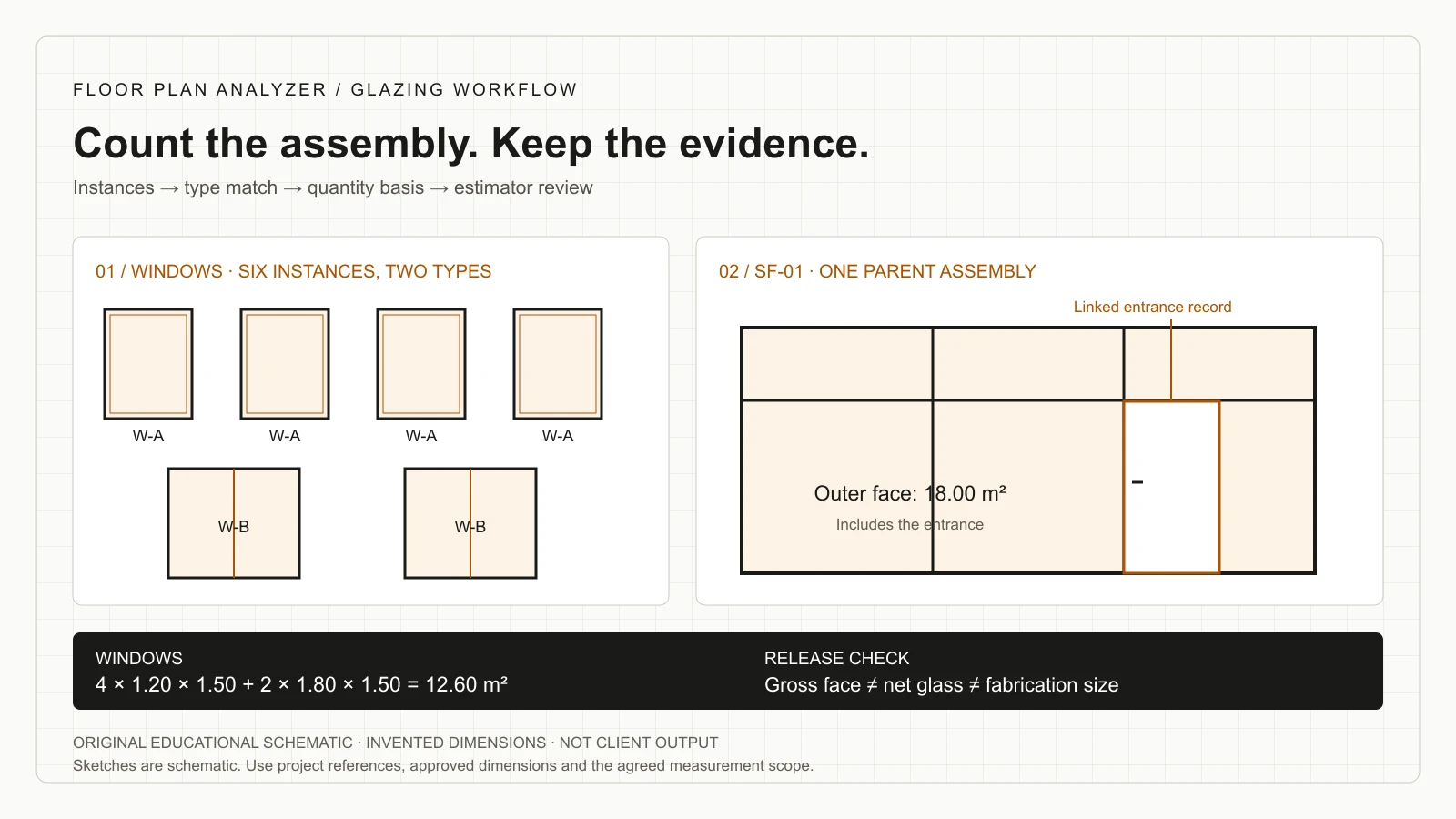
This is invented teaching data, not a client project or measured AI output. Assume one revision contains four W-A windows, each scheduled at 1.20 × 1.50 m, and two W-B windows at 1.80 × 1.50 m. Our chosen example measures rectangular gross assembly faces using those dimensions.
The six window instances total 12.60 m²: four × 1.20 × 1.50 = 7.20 m², plus two × 1.80 × 1.50 = 5.40 m². There are six physical windows and two types. Counting the schedule’s two type rows as two installed windows would answer a different question.
Now add one 6.00 × 3.00 m storefront assembly, SF-01, containing one 1.00 × 2.10 m entrance. Its outer face is 18.00 m². If a separate estimating scope excludes the rectangular entrance opening, the arithmetic remainder is 15.90 m². That remainder still includes framing and is not net glass.
The example’s total outer assembly face area is 30.60 m²: 12.60 + 18.00. Do not add the entrance’s 2.10 m² to that total; it already lies inside SF-01. Whether the door is a separate priced item is an explicit scope decision, not a reason to double count geometry.
| Example item | Count | Dimensions / calculation | Area | Basis |
|---|---|---|---|---|
| W-A | 4 | 1.20 × 1.50 m | 7.20 m² | Gross assembly face |
| W-B | 2 | 1.80 × 1.50 m | 5.40 m² | Gross assembly face |
| SF-01 | 1 | 6.00 × 3.00 m | 18.00 m² | Includes entrance within outer boundary |
| Entrance within SF-01 | 1 | 1.00 × 2.10 m | 2.10 m² | Child record; do not add to parent area |
| SF-01 less entrance | Derived | 18.00 − 2.10 | 15.90 m² | Alternative scope; still not net glass |
An output schema your estimating team can actually review
Agree the workbook contract before model training. Your team may group windows by type for pricing but still need an instance-level audit trail. Keep those two layers: reviewed instances with source references, and a reproducible roll-up into the estimating format.
The downloadable CSV contains three fictional grouped scope rows matching the example’s W-A, W-B and SF-01 outer assemblies. It intentionally excludes a separately priced entrance line to avoid implying a pricing rule. It includes source, dimension-basis and review fields; all sample rows require review. Replace the examples before operational use.
For a production integration, define handling of blanks, units, duplicate keys, revision changes and rejected records. Preserve spreadsheet formulas and supplier-specific coding. A database or API can expose the same contract when the downstream system is not Excel.
| Field group | Suggested fields | Purpose |
|---|---|---|
| Identity | Instance ID, type mark, parent assembly, level/location | Keep six instances separate from two type definitions |
| Evidence | Sheet, revision, view, coordinates and schedule row | Every released quantity can be inspected |
| Dimensions | Raw text, numeric width/height, units and basis | Do not interchange rough opening and frame size |
| Quantity | Count, length/area, calculation and scope rule | Distinguish parent area from component area |
| Specification | Literal code, resolved meaning and source | Missing performance fields remain unresolved |
| Review | Match state, issue reason, reviewer and release status | Exceptions must not masquerade as approved data |
References: Download the fictional glazing takeoff review template (CSV)
Handle missing marks, duplicate views and revisions explicitly
Not every unpaired item is an error in the source. A schedule can include a type not used on the selected floor, an alternate can add openings outside the base scope, and an elevation can repeat the same physical assembly. Store the reason and let the estimator decide which scope receives the item.
When tags repeat, combine location evidence, view references and the project’s naming convention. A pipeline should not deduplicate every W-A label globally or treat every detection crop as a new instance. Compare physical occurrences, then roll them up to types.
For addenda, hold the previous reviewed quantity snapshot and the new issue separately. Compare stable identities and source changes before calculating a quantity delta. Report changed dimensions, changed specifications and changed quantities as different events. A note-only change may matter commercially even when the opening geometry is identical.
| Exception | Review action | Avoid |
|---|---|---|
| Plan mark has no schedule row | Flag unmatched occurrence | Inventing the missing size |
| Schedule type has no plan occurrence | Check scope, level and alternatives | Assuming zero or adding one instance |
| Same opening appears in plan and elevation | Link to one physical instance | Counting both views |
| Two documents state different dimensions | Show both sources and request resolution | Choosing whichever OCR score is higher |
| New revision changes a glazing code | Review specification change independently | Reporting no change because counts match |
Choose a narrow pilot with acceptance criteria before committing
A useful pilot is the smallest complete workflow that can reach the receiving estimator: a representative set, an agreed output template and a named reviewer. Include difficult pages and hold some examples back from training so you can inspect behavior on unfamiliar drawings.
Evaluate page selection, instance detection, schedule transcription, type association, dimension parsing, quantity arithmetic and export validity separately. An average score can hide a missed large assembly or a systematic unit conversion error. Record the operational consequence of each error category rather than treating every character mistake as equivalent.
Before the pilot starts, agree the pass/fail conditions, tolerated manual work, required evidence, review time measurement and handling of unsupported inputs. Set numeric thresholds with your own reviewer after the sample and task are understood; this guide supplies no unmeasured accuracy promise.
End the pilot with accepted records, an exception log, reviewer corrections and a decision about the next scope. That decision can be to fine-tune further, retain a partly manual process or stop because the expected value is insufficient.
- Freeze the sample set, issue and output columns.
- Agree the counting, grouping, opening-deduction and dimension rules.
- Include scans, repeated types, multi-scale views and at least one conflicting reference.
- Compare results against reviewer-approved records, not another unverified extraction.
- Measure total preparation, review and correction effort, including failures.
- Document unsupported cases before expanding the workflow.
Build the business case around total reviewed effort
An estimator’s time saved at counting can be lost again in checking, reformatting or repairing schedule matches. Measure the baseline for the same deliverable: set preparation, takeoff, checking and transfer to the estimating tool. Compare that with preparation, processing oversight, review, correction and export after automation.
A practical decision formula is: monthly labour value = eligible sets per month × net reviewed hours saved per set × internal loaded hourly cost. Compare that value with implementation amortization, operating costs, software/model maintenance and ongoing exception handling. Populate the formula with observed pilot data, not a vendor’s headline percentage.
Keep bid quality and risk visible alongside labour. Record unresolved items, late changes and missed-scope incidents, but do not monetize hypothetical avoided mistakes as if they were proven savings. Some businesses gain value from a more consistent audit trail even when the time result is modest.
Custom engineering is most plausible when drawing formats repeat, volume supports the investment, the workflow has specific fields/rules and someone owns ongoing review. If each job is unique, volume is low or the available set lacks the necessary evidence, a capable estimator with existing measurement tools may remain the better operating choice.
Keep your estimating tools, and customize only what needs it
Treat existing takeoff software and custom drawing intelligence as alternatives to test or as connected stages, depending on the workflow. Ask any vendor to demonstrate your sample drawings, the desired output, correction process, export and revision handling. A generic product tour cannot establish fit for an unusual glazing schedule.
If your software already produces the accepted workbook efficiently, there may be no reason to rebuild it. A custom pipeline can instead target a narrow gap such as rotated schedule OCR, your own tag conventions or an integration into an internal estimating database.
Clarify ownership and operating responsibilities before a build: training-data rights, model/code handover, deployment location, third-party services, retention, version updates and who approves changed extraction rules. These are scoping decisions; they do not imply a standard subscription or a ready-made public API.
Relevant delivered work—and the boundary of that evidence
Our documented window-schedule project delivered an OCR and dimension-parsing pipeline for a glazing subcontractor and window manufacturer. Its inputs were 300 DPI scanned schedule sheets, including rotated text and trade abbreviations. The output was CSV window records with parsed dimensions, also available through a service endpoint.
That case supports the schedule-transcription part of this workflow. It does not establish that every glazing set, curtain-wall system or supplier template is already supported. The project page labels its stage as Delivered pipeline and states that another firm’s sheets need their own tuning pass. Its illustration is our output on a comparable sheet; the client’s drawings are confidential.
For your engagement, we start with your documents and required fields, fine-tune our drawing models where needed and build the integration around your review process. Your pilot, rather than another client’s result, supplies the evidence for your acceptance decision.
References: Delivered project: window schedules off scanned sheets
What to send for a glazing takeoff feasibility review
Share a representative plan and its associated elevation, schedule and relevant notes, together with your estimating template and a marked example of a correct quantity. Include the issue/revision and explain whether the first goal is counts, schedule extraction, area measurement or reconciliation.
Identify the reviewer and the commercial boundary: which assemblies belong in the bid, which alternatives are separate, and which quantities require a supplier’s interpretation. We can then scope a practical pilot, required annotation work, output contract and review controls.
Leave your work email above to arrange the next step for sharing the set, or use the one-sheet analysis form below when you have a suitable sample. The email enquiry alone does not upload drawings. Floor Plan Analyzer is AxcelerateAI’s custom drawing-intelligence practice; the work is engineered for your documents and workflow.
Frequently asked questions
Can AI count windows from architectural PDFs?
A drawing-specific detector can propose opening instances, while OCR and schedule matching add type information. Review repeated views, missed labels and scope exclusions. Evaluate instance counts and type matches separately on representative sets.
Can it distinguish storefront from curtain wall?
That classification should use the referenced system, elevations, schedules and specifications as well as geometry. Agree your output categories; similar-looking lines alone do not reliably establish the specified system.
Can AI calculate glass ordering sizes?
A gross drawing area is not a glass cut size. Ordering requires the applicable system details, approved dimensions and supplier/fabrication process. Do not release a fabrication order from unreviewed extraction.
How should storefront entrance doors be counted?
Retain a linked child record and agree its pricing scope. The worked example includes an entrance within the parent storefront face, so adding the entrance area again would double count that geometry.
Does a window schedule give the installed count?
Not necessarily. A schedule row can define a repeated type rather than a single physical occurrence. Link it to the relevant plan instances and scope before rolling up quantities.
Can this work with scans and rotated schedules?
Our documented window-schedule project used 300 DPI scanned sheets with rotated text. That is evidence for the specific delivered workflow, not universal support. Different lettering, scan quality or schedule layouts need their own evaluation and tuning.
Can the output go into our Excel template?
Yes, an engagement can target your existing columns and calculation rules. The output mapping, units, evidence fields, exception handling and formula preservation must be scoped and verified.
What accuracy and savings should we expect?
Use a representative pilot to measure missed/extra instances, transcription, associations, quantity errors and total reviewed effort. No accuracy or time-saving percentage in this guide is a measured promise for your drawings.
Is this an off-the-shelf glazing subscription?
Floor Plan Analyzer is AxcelerateAI’s drawing-intelligence practice. We fine-tune models and build custom software around your documents and workflow; scope and commercial arrangements are agreed for the engagement.
References and illustration notes
Sources support the terminology and interpretation notes cited above. Worked examples and diagrams are our own educational material, not client drawings or measured project results.