Floor Plan Abbreviations: Glossary and Reading Guide
By Floor Plan Analyzer, an AxcelerateAI practice
Floor plan abbreviations compress room names, materials, references and instructions into a few letters. Reading the letters is easy; assigning the wrong meaning to a short note is where a takeoff or data export can go wrong.
This guide provides 70 alphabetized lookup entries, an editable CSV and worked examples for heights, ambiguous tokens and drawing OCR. It focuses on English-language architectural and supporting drawing notation; regional and office conventions vary.
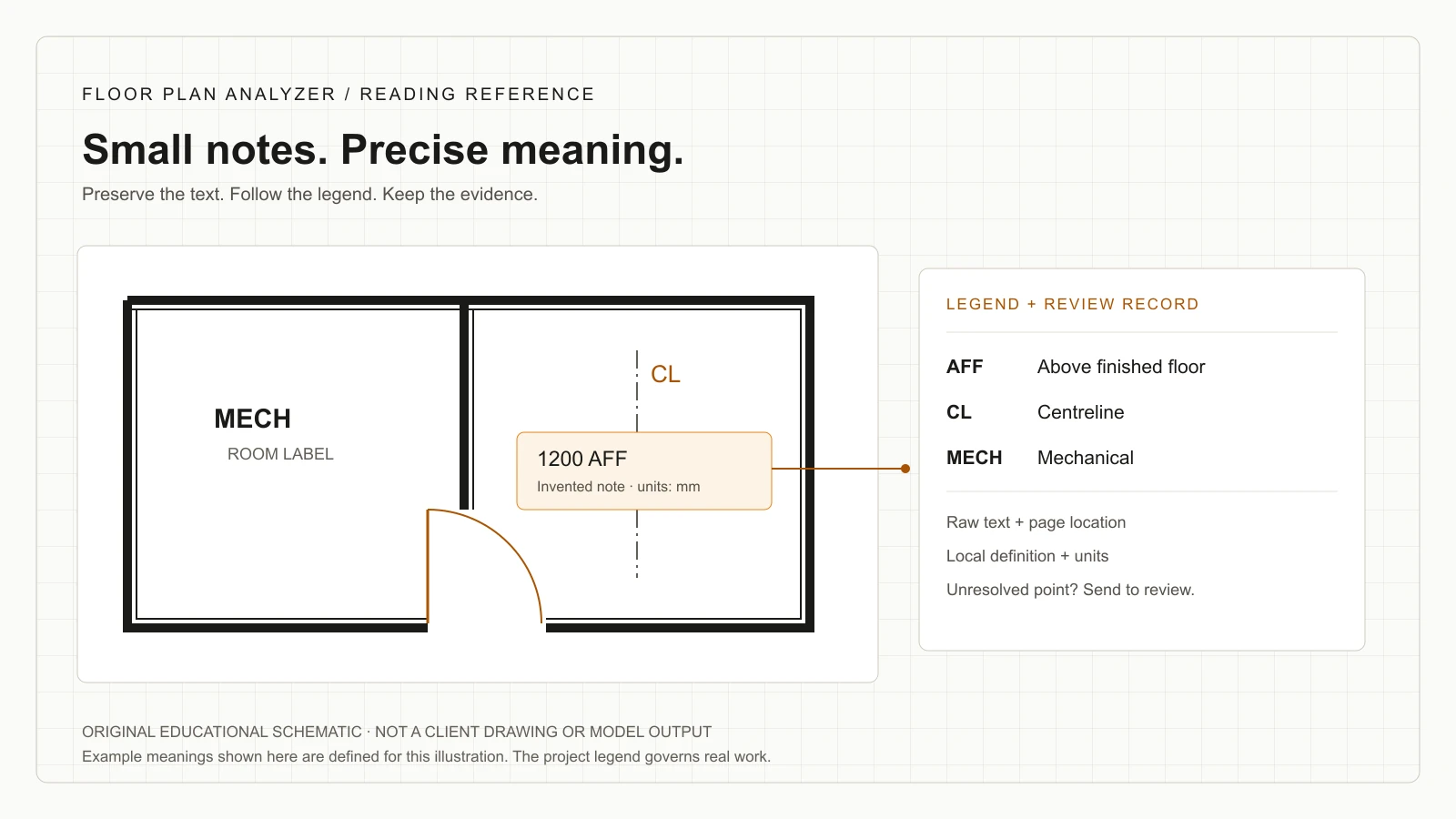
What do floor plan abbreviations mean?
They are shortened words or phrases defined for a drawing set. AFF commonly means above finished floor, CL can identify a centreline and NTS means not to scale in the cited references. Use the project legend and sheet context to resolve the actual meaning; letters alone do not establish an object, quantity or construction requirement.
- Keep the project legend and sheet revision alongside each interpretation.
- Separate raw text, candidate expansion, units, object association and review status.
- Preserve ambiguous meanings and verification requirements instead of guessing.
Read the drawing legend before using a glossary
The fastest reliable lookup starts with the drawing set itself: title and issue, sheet discipline, abbreviations list, then the note or tag in context. A glossary supplies candidate meanings. The legend supplies the meaning the drawing author intended for that set.
This distinction is visible in primary documents. The VA reference gives more than one expansion for several letter groups, including BM, CO and DR. The Princeton project legend defines FFL as finished floor line. Treat those as examples of actual authored conventions, not proof that all projects use the same vocabulary.
For a practical workflow, record the token exactly as printed, the proposed expansion and the evidence that supports it. If the set does not define it and context still allows two meanings, mark it unresolved and ask the drawing author. An apparently complete spreadsheet with guessed definitions is harder to review than an explicit question.
References: VA architectural abbreviation reference, issued December 2008 · Project-specific architectural legend: Griggs Corner
Quick lookup and downloadable glossary
The following 70 entries cover frequently encountered architectural and supporting drawing terms. They are selected reference meanings, not a mandatory drafting standard or an exhaustive list of every discipline. Punctuation, office conventions and project legends can change the interpretation.
Download the CSV to make a project-specific review list. It contains the same terms, context checks and source links as this guide. Add the definition from your own legend and the sheet/revision that establishes it. The context-check column is original editorial guidance, rather than a construction specification.
On a desktop, use the browser’s Find command to locate a token. On a narrow screen, each table scrolls horizontally so the full term and context remain available. The alphabetical groups below are also linked from the contents.
References: Download the editable abbreviation glossary (CSV)
Abbreviations A–C
Use the local legend to resolve alternatives. Read the final column as a review prompt, not an instruction to install or alter anything.
| Token | Reference meaning | Context to check |
|---|---|---|
| ACT | Acoustical ceiling tile | Read on a ceiling view; retain the finish/type reference. |
| AD | Area drain | Check the discipline and legend before assigning a plumbing object. |
| AFF | Above finished floor | A relative height needs a value, unit and the feature being located. |
| AFG | Above finished grade | Keep the exterior grade reference distinct from an interior floor. |
| ALUM | Aluminium | Material shorthand does not specify alloy, finish or assembly. |
| APPROX | Approximate | Retain the qualification; do not export it as an exact dimension. |
| ARCH | Architect / architectural | Use sheet context to distinguish the discipline from a party. |
| BLDG | Building | A descriptive label, not a unique building identifier by itself. |
| BM | Beam / benchmark | A structural member and a survey reference need different records. |
| BOT | Bottom | Find the object and datum to which the note refers. |
| BR | Bedroom | A room label needs its room boundary and identity. |
| BSMT | Basement | Store the level separately from a room name. |
| CAB | Cabinet | Do not count a label as an additional cabinet instance. |
| CJ | Construction joint / control joint | Resolve the exact joint from the detail or legend. |
| CL | Centreline | Check the indicated reference line rather than assuming a wall face. |
| CLG | Ceiling | A ceiling label is not automatically a height. |
| CLR | Clear | Identify the endpoints and any stated clearance condition. |
| CMU | Concrete masonry unit | Use the assembly reference for actual construction requirements. |
| CO | Cleanout / carbon monoxide / certificate of occupancy | A plumbing note, device label and document reference are different contexts. |
| COL | Column | Preserve the member tag when one is present. |
| CONC | Concrete | Do not infer mix, reinforcement or strength from the abbreviation. |
| CORR | Corridor | Treat as a space label, then resolve the room/space identity. |
| CPT | Carpet | Confirm the finish schedule and the area to which it applies. |
| CT | Ceramic tile | Resolve the finish/type code before calculating quantities. |
References: VA authored abbreviation reference · Project legend (FFE, FFL and GWB)
Abbreviations D–F
Use the local legend to resolve alternatives. Read the final column as a review prompt, not an instruction to install or alter anything.
| Token | Reference meaning | Context to check |
|---|---|---|
| DBL | Double | Determine whether it modifies glazing, a door or another component. |
| DEMO | Demolition | Check the phase and issue before assigning removal status. |
| DET | Detail | Follow the referenced view and sheet. |
| DIA | Diameter | Keep the diameter symbol/value distinct from a linear width. |
| DIM | Dimension | Read its actual value, units and extension points. |
| DR | Door / drain / dressing room / drive | A nearby symbol or room context is essential. |
| DW | Dishwasher | Check whether the drawing depicts equipment or an appliance allowance. |
| DWG | Drawing | Retain the sheet identifier and revision rather than the label alone. |
| EA | Each | A unit/count basis, not a measured length. |
| EJ | Expansion joint | Follow its location and detail reference. |
| EL | Elevation | Determine the datum and the feature whose level is stated. |
| ELEC | Electrical | A discipline or space descriptor; not an equipment instance. |
| ELEV | Elevator | Confirm locally: another set may abbreviate elevation differently. |
| EQ | Equal | Read the extent of the equal-spacing or equality instruction. |
| FA | Fire alarm | Identify the specific device or system in its own legend. |
| FD | Floor drain | Keep its instance, location and schedule reference. |
| FE | Fire extinguisher | Resolve the symbol and type; the text alone is not a verified count. |
| FEC | Fire extinguisher cabinet | Distinguish the enclosure from its contents for the takeoff scope. |
| FFE | Finished floor elevation | This is a level reference in the cited project legend. |
| FFL | Finished floor line | The cited project uses line; other sets use level. Preserve the local definition. |
| FIN | Finish / finished | Find the surface or feature being modified. |
| FLR | Floor | Does not by itself distinguish finish level from structural level. |
| FOF | Face of finish | The reference face can differ from the core or stud face. |
| FOS | Face of slab / face of stud | Resolve the intended construction reference before measuring. |
| FT | Foot / feet | Preserve units; do not silently treat the value as metres. |
References: VA authored abbreviation reference · Project legend (FFE, FFL and GWB)
Abbreviations G–M
Use the local legend to resolve alternatives. Read the final column as a review prompt, not an instruction to install or alter anything.
| Token | Reference meaning | Context to check |
|---|---|---|
| GWB | Gypsum wall board | Resolve the assembly rather than treating the label as a thickness. |
| HM | Hollow metal | Read with the door/frame schedule, where applicable. |
| HT | Height | Find its value, unit and reference points. |
| HVAC | Heating, ventilating and air conditioning | A system category; consult the services drawings for equipment. |
| INSUL | Insulation | Confirm the material/type and extent from the specification or detail. |
| INT | Interior | A location description, not a full construction type. |
| KIT | Kitchen | Resolve as a room label, with the relevant space record. |
| LAV | Lavatory | Check the fixture legend and schedule. |
| LF | Linear feet | Keep length units separate from counts and face areas. |
| LR | Living room | Do not merge rooms just because their abbreviated names match. |
| MECH | Mechanical | A discipline or room description; use its sheet context. |
References: VA authored abbreviation reference · Project legend (FFE, FFL and GWB)
Abbreviations N–R
Use the local legend to resolve alternatives. Read the final column as a review prompt, not an instruction to install or alter anything.
| Token | Reference meaning | Context to check |
|---|---|---|
| NTS | Not to scale | Do not obtain a reliable dimension by scaling this view. |
| OC | On centre | Identify the repeated elements and direction of spacing. |
| PL | Plate / property line | Use structural versus site context to choose the interpretation. |
| RM | Room | Keep the room number and name as separate fields. |
| RO | Rough opening | Do not substitute it for the finished clear opening. |
References: VA authored abbreviation reference · Project legend (FFE, FFL and GWB)
Abbreviations S–Z
Use the local legend to resolve alternatives. Read the final column as a review prompt, not an instruction to install or alter anything.
| Token | Reference meaning | Context to check |
|---|---|---|
| SIM | Similar | Read the applicable detail and any noted differences. |
| TYP | Typical | Determine which repeated locations the note actually covers. |
| VIF | Verify in field | Retain the verification requirement in any exported record. |
| W/ | With | Preserve the connection to the following material or condition. |
| W/O | Without | Losing the slash changes the instruction; retain the raw text. |
References: VA authored abbreviation reference · Project legend (FFE, FFL and GWB)
AFF, FFL and FFE: a relative height is not a floor datum
AFF expands to above finished floor in the cited legends. It modifies a height measured from the finished floor, but it does not identify which point on the object the dimension locates. Read the note, leader and detail before deciding whether the stated height refers to the centre, top or underside.
Keep floor-reference text exactly as the project defines it. The Princeton legend uses FFE for finished floor elevation and FFL for finished floor line. Other sets use FFL for finished floor level. Do not rewrite one to another merely to make a dataset look consistent; store a normalized field alongside the original wording.
For an invented arithmetic example, suppose a project explicitly defines its finished-floor datum as +12.000 m and locates a device centre 1,200 mm AFF. After converting 1,200 mm to 1.200 m, that centre is at +13.200 m under those assumptions. The addition only works because both the datum and the point being located were specified. It is not a recommendation for device mounting height.
A common extraction error is to read “1200 AFF” as an absolute site elevation or to drop AFF and retain only 1200. Preserve a measurement record with value, unit, reference datum, measured feature and source location. If units or reference points are missing, keep the result pending review.
References: Princeton project legend: AFF, FFE and FFL · VA reference: AFF and floor-related notation
Ambiguous tokens: resolve meaning with discipline and nearby evidence
CO illustrates why a global dictionary is insufficient. The VA document lists cleanout, carbon monoxide, certificate of occupancy and company. A plumbing plan, a device legend and an administrative note offer different contexts. The same letter pair must not automatically create the same object class everywhere.
Use two checks before accepting an expansion: does the local legend define this token, and does the associated geometry or note support that definition? A leader ending at a fixture can help associate text, but proximity alone is weak evidence on a crowded sheet. Keep the source crop or coordinates for review.
Also distinguish an abbreviation from an identifier. A token such as D-101 can be an instance tag whose meaning comes from a schedule rather than a word to expand. A repeated room name is not necessarily a unique room. Autodesk documents the association between room properties, room schedules and room tags; this supports keeping identity and displayed text separate in your output.
The table below is an original triage workflow. It suggests which evidence to inspect first; it cannot settle a real project’s conflicting documents.
| Token / situation | Evidence to inspect | Safe unresolved result |
|---|---|---|
| BM beside a point or member | Local legend, discipline and leader target | Meaning unresolved; preserve both candidates |
| CO near a fixture/device | Plumbing or device legend and referenced schedule | Unclassified annotation with source coordinates |
| FOS in a dimension note | Assembly detail and actual extension points | Measurement reference unresolved |
| D-101 in several views | Schedule identity, level, view and physical opening | Candidate instance match; not an automatic duplicate |
| CL near a room or dimension | Local definition and line/space association | Keep literal text until context resolves it |
References: VA reference: multiple meanings for the same token · Autodesk: room schedules and tags
Drawing abbreviations, units and scope instructions need different fields
Not every short string belongs in a material or object column. Some describe geometry, some name spaces, some change how a dimension should be used, and some qualify the instruction. A useful review table keeps these categories separate so the receiving workflow does not treat every OCR string as a detected item.
For example, a count marked EA and a length marked LF have different quantity bases. Likewise, TYP describes an instruction’s intended repetition, while VIF preserves a requirement for checking the actual condition. Neither is a measured property of a wall. A clean export must retain the qualification even if a normalized quantity is stored elsewhere.
When the abbreviation legend defines a view as NTS, avoid deriving a dependable length from the printed scale of that view. Seek the stated dimension or another suitable reference. A PDF displayed at an arbitrary zoom does not supply the missing measurement basis. Do not turn the absence of a dimension into a precise-looking number.
As a reviewer, choose a minimum record before extracting: raw token, category, normalized interpretation, units where relevant, linked object or view, evidence reference and review status. Add project-specific fields rather than forcing every office’s conventions into one fixed vocabulary.
Worked review: turn a short note into an auditable record
Consider the invented note “TYP: VERIFY HT, 1200 AFF” beside a leader. An OCR transcription is only the first output. The reviewer must still identify the target, locate the units and find whether the height is a design value, an existing-condition observation or a field-verification request.
Under an invented legend where HT means height, AFF means above finished floor and dimensions are in millimetres, you can record a candidate relative height of 1,200 mm. Keep the verification wording attached. Without knowing which part of the target the height locates, do not release it as a final installation dimension.
The following record deliberately includes unresolved fields. It is an example of a reviewable data contract, not a result obtained from a client drawing or a benchmark of our models.
| Field | Recorded example | Reason |
|---|---|---|
| raw_text | TYP: VERIFY HT, 1200 AFF | Preserve the source wording |
| candidate_relative_height | 1200 mm | Only under the invented unit convention |
| reference | Finished floor | Derived from the invented AFF definition |
| target / reference point | Unresolved | Leader target or measured point still needs review |
| qualification | Typical; verify height | Do not discard instruction words |
| source | [Sheet / revision / bounding box] | Real extraction must preserve provenance |
| review_status | Needs clarification | No invented certainty |
OCR and AI: preserve the token before normalizing it
For drawing-intelligence work, build the document-understanding step before global abbreviation replacement. Select relevant sheets and find their legends, notes and schedules. The extraction should know which issue and discipline supplied each candidate definition.
Preserve raw text, coordinates, orientation and the page reference. Keep a second field for normalization: A.F.F. and AFF may be matching candidates under a project rule, while a slash in W/O changes the instruction and must survive. Handle confusion between letters, digits and punctuation as review cases rather than silently correcting every unfamiliar string.
A practical validation set should include the abbreviations that matter to your receiving workflow, repeated tags, rotated notes, small text and contradictory local definitions. Measure transcription, interpretation and object association separately. A model that reads the characters correctly can still attach the right meaning to the wrong door.
Floor Plan Analyzer is AxcelerateAI’s drawing-intelligence practice. We fine-tune models on your drawings and engineer the extraction around your fields, source references and review rules. For a useful scoping sample, share the plan, its abbreviation legend and an example of your desired output. Leave your work email above to arrange how to share those files; an email alone does not submit a drawing.
Checklist before using an expansion in a takeoff or integration
Use this original checklist to close the reading task. A glossary should help you ask a more precise question when the set is incomplete.
- Confirm the correct drawing set, issue, sheet discipline and language.
- Find the project’s legend; retain its wording and sheet reference.
- Separate abbreviations, instance tags, type tags and quantity units.
- Inspect the leader, nearby geometry and schedule rather than proximity alone.
- Preserve qualifiers, slashes, units and datum references in the raw text.
- Keep field-verification requirements attached to the interpreted value.
- Flag multiple candidate meanings instead of forcing a global expansion.
- Have the appropriate project reviewer resolve information before downstream use.
References: City of Newport: include abbreviations in the plan legend (general specifications)
Frequently asked questions
What does AFF mean on a floor plan?
In the cited legends, AFF means above finished floor. Read the value, units, leader and detail to establish which point is being located. It is a relative height reference, not an absolute site elevation.
Does FFL always mean finished floor level?
No universal expansion should be assumed. Many drawings use finished floor level, while the cited Princeton project legend uses finished floor line. Preserve the project’s definition and its datum information.
What is the difference between CL and CLG?
The VA reference defines CL as centreline and CLG as ceiling. Confirm the local legend; do not lose the final character during OCR or normalize both to the same field.
Can CO have more than one meaning?
Yes. The VA reference includes cleanout, carbon monoxide, certificate of occupancy and company. The discipline, local legend and association with the drawing determine the interpretation.
Are abbreviations standardized across all architectural plans?
Do not treat a general lookup as a universal standard. The intended project legend, office conventions, language and discipline control the interpretation of the drawing you are reading.
Can I measure a view marked NTS?
NTS means not to scale in the reference vocabulary. Use an explicit dimension or appropriate supporting source rather than deriving a reliable length from that view’s printed size.
Can AI expand all drawing abbreviations automatically?
An extraction pipeline can transcribe text and propose interpretations using the local legend and context. Ambiguous tokens, missing units and uncertain object links still need a review path. Evaluate these tasks separately on representative drawings.
Can I download the glossary?
Yes. The editable CSV contains the same 70 entries, context checks and source links shown here. It is a reading aid; add your project legend and revision references before using it operationally.
References and illustration notes
Sources support the terminology and interpretation notes cited above. Worked examples and diagrams are our own educational material, not client drawings or measured project results.
- VA architectural abbreviations: Standard Details Division 00 (issued December 2008; reference vocabulary, not a current project specification)
- Griggs Corner: project-specific abbreviation legend (public municipal drawing set)
- Autodesk Revit 2025: room schedules and room tags
- City of Newport: General Specifications, terms and abbreviations (2025 file)